Showing posts with label google docs. Show all posts

Friday, July 01, 2011

A multimedia super machine

.. what would that be today?

Today the multimedia business is rapidly (r)evolving with ever more possibilities and more machines are coming together. Telephone, Internet and TV are converging with more and more functionalities coming in as well.
I find it difficult to keep up to date, but still I try. Every month, it seems, some new gadget comes onto the market that has some completely new amazing function or a better way to do something an other device already did. It's hard to keep up with it.
My multimedia center is not yet complete
Although my multimedia machinery is relatively complete I still miss some functionality. I can not playback all the movies I hold on my NAS (DLNA enabled) and I can not record TV shows. Or time shifting. I can do some browsing on my TV and on my Wii but neither is great.
So there are somethings that I would want to add to my setup. But I only want to add a single machine that holds all possible options I can think of. At least that I can think off today.
If only I could think of all the options available today.
And that's where you come in
Since it is impossible for me to compile the list of maybe all the options that are out there at this moment I have decided to crowdsource this task. I have shared a Google Docs document that you can freely edit.
Please bear in mind that I don't want the machine to make coffee, do the laundry and walk the dog. So please only realistic requirements for the machine.
So if you want to help me find the requirements for my next Multimedia Super Machine just click the link and add to the document.
Many thanks in advance!

The results so far
Have a lookie!

Scroll about :-) or just click the link and have better view and maybe even add or correct.
Enhanced by Zemanta

Thursday, February 07, 2008

Google Docs has an interesting new feature

.. and it came at the right moment

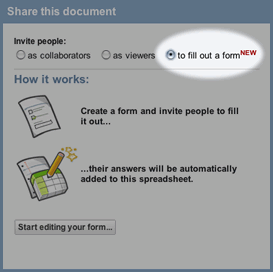
Today I discoverd on the Offical Google Docs blog that they have introduced a new feature. You can now share a spreadsheet through a customizable form. Or perhaps it is easier explained the other way round: you can now create a form (like a survey or something similar) that you can send out by email and have the entered data land in a Google Docs spreadsheet. You can then process that information further.

Well, what a coincidence

I am busy doing an internal project which I have hinted about in the past and have come to the point where I would like to get some feedback from my colleagues. Since they are spread out doing various projects at various companies, it is a bit time wasting to wait until the next monthly meeting. So, the online survey thingy from Google Docs comes in very handy!

So, I carefully pulled together the questions I have and created the online form. That is really simple. Type the question (with an optional explanatory paragraph), pick the type of question, for (multi-)select questions (radio buttons or checkboxes) enter the possible questions and continue to the next question. When all the questions are done, you just fill in the email addresses of the people who you want to ask the questions and send it away.

You can keep the spreadsheet open to see the entries coming in, or add a gadgets to your iGoogle page. And by George, it works!

Wednesday, February 06, 2008

Just a test post

.. well that's what it is

Not really that much here in the sense of real content. I am just testing if I can publish a blog post from Google Docs. Just for testing, hence the bogus content that goes on and on and on.

And now you read it ...

.. and you know it works. It might be a bit weird to look at, but then I will probably jump in the Blogger editor and clean things up. If not I will just leave it at this. I will post an update anyhow.

That is all

Yep, that is all.

Update

Well, it sort of works. There seem to be some difference in presentation or it is me. Now I am updating the post from within the Blogger editor and I will see if that makes thing normal again.

Conclusion

Using Google Docs as the editor has some advantages over the Blogger editor. But nothing really shocking AFAICT.